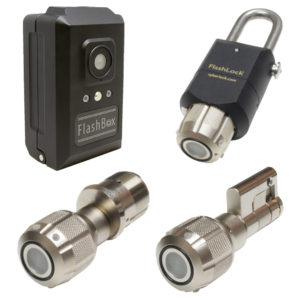
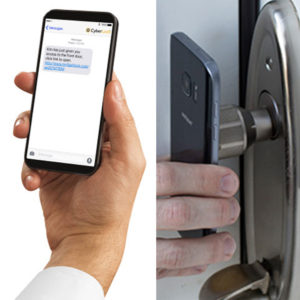
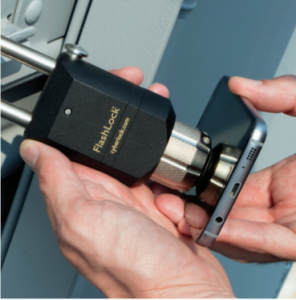
FlashLock’s keyless solution improves security, key control, and accountability throughout your organization. FlashLock is designed to put access control in the palm of your hand. Using serial optical communications technology combined with a web-enabled device, issue and receive access to any lock retrofitted with FlashLock. Simply open a FlashLock access link and hold the screen to the face of the lock.

FlashLock eliminates the need to worry about lost or stolen keys, copied keys and more! With FlashLock, your cellular device is your key. For everyday use, FlashLock can also be opened using a simple and compact FlashLock fob. The IR Encoder is a USB-to-infrared device that facilitates communication between the FlashLock, Fobs and a computer / smart device to program and update configuration.

What is FlashLock?

FlashLock is a keyless lock that opens when you hold a phone screen up to it. The phone flashes a coded pattern of light, the lock reads it, and the knob turns. There is no wiring to run to the door, no cylinder to rekey, and no metal key anyone can copy or lose.

No wiring to run. FlashLock runs on a single CR123 lithium battery that typically lasts a year or more at up to 10 open and close cycles a day. Nothing gets hardwired and no electrician has to come out, so it works on a gate, a cabinet, a remote cabin or a rack door.

The flash is not a fixed password. Each one carries a rolling code, the same principle a garage door opener uses, so a flash that was recorded once cannot be replayed later to open the lock.

Buyers search for this product under several names. Flash lock, flash access, and flash access key all describe the same thing, and on this site it is called FlashLock.

How a flash access key works, step by step

  1. You send someone an access link by text or email, or you assign them a recurring schedule in the software.
  2. They open the link on any web-enabled phone, tablet, or laptop. Nothing to install and no Bluetooth to pair.
  3. They hold the screen against the face of the lock and the screen flashes.
  4. Inside their assigned window the lock flashes back and the knob turns. Outside it, the flashing screen does nothing.
  5. The attempt lands in the activity log with the who, the where, and the when.

Staff who open the same lock every day can carry a compact FlashLock fob instead of using a phone. An IR Encoder, which is a USB-to-infrared device, programs the locks and the fobs from a computer.

No Keys

The innovative “flash” technology allows you to use your smart phone to gain access.

Flexible Access Options

FlashLock offers flexible access options. Users can receive a secure text message link for temporary or one-time access, or use the mobile app for full-time employees who need quick daily access and simple management.

No Bluetooth

FlashLock uses infrared communication for access, no waiting for bluetooth to pair.

Managing Access

Send and receive duration limited access via text or email. Once users access the link, the screen of the hand-held device will flash. Users simply hold the phone up to the FlashLock face. If used during their assigned access schedule the lock will flash and the knob can be turned. If used outside of their access schedule the flashing screen will not open the lock.

Emergency Access
Someone need emergency access? Simply text them a one-time access code granting permission for a desired time frame.

Scheduled Access
Someone need regular access? Create access schedules for your contacts. Specify the day, time, location, and duration of access. Easily revoke access at any time.

Multiple Locks
Have more than one lock? Manage multiple locks from one platform. Name your locks and create custom settings specific to each FlashLock.

Tracking Access

To adjust or remove permissions, a user-friendly, web-based interface allows customers to make changes at any time. Additionally, FlashLock can be integrated into a larger CyberLock system using CyberAudit Web 9.0. This allows users to integrate CyberLock cylinders and smart keys with FlashLock and FlashLock fobs.

Activity Logs
Want to know who is coming and going? Activity logs let you monitor where, when, and by whom your locks were accessed.

Real Time Alerts
Want to be notified as soon as access is attempted? Receive instant notifications via text message sent directly to your phone.

Secure Items with FlashBox!

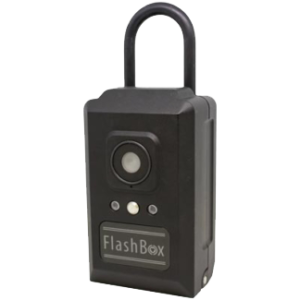
Mechanical keys or other items can also be secured with FlashBox!
FlashBox is a breakthrough keyless lock box that facilitates access control using any web-enabled device (iOS, Android, BlackBerry, Windows). FlashBox can be Shackled over a Doorknob, Hung over a Door, or Mounted to a Wall

Need Access in a Flash?

  • Grant Duration Limited Access Codes via a Web-Enabled Device
  • Send an Access Code to Contractors, Guests, or Family Members, Allowing Access to the Contents of FlashBox
  • No App Required to Receive Access – Open via a Web-Enabled Device
  • Heavy Duty Construction with Patented Serial Optical Communication Technology

Applications for FlashLock are limitless! It is an ideal solution for residential or vacation homes, college dorms, apartments, hotels, churches, and more. FlashLock allows owners of residential facilities to control who enters what space at what time.

Common questions about FlashLock

What is a flash lock?

A flash lock is a lock that reads a coded burst of light from a screen instead of accepting a metal key or a card. FlashLock is TEC Solutions’ version. You hold your phone to the lock, the screen flashes, and the lock opens if that person is inside their access schedule.

Does FlashLock need power or wiring at the door?

No. There is nothing to trench, no reader to mount on the wall, and no network drop to pull. FlashLock runs on its own battery, so it goes on gates, cabinets and remote sites where running power was never realistic.

Is this the same as a Bluetooth lock?

No. Bluetooth locks pair over radio and you wait for the handshake. FlashLock reads light from the screen, so there is no pairing step and no radio signal in the air to intercept.

Is it only accessible from my phone?

No, FlashLocks may also be opened via infrared communication with fobs or with CyberKey Flash and CyberKey Air2. Both the fobs and CyberKeys carry access permissions, schedules, and expiration to control if and when they may open a given FlashLock.

How do I grant permission for Flash Access?

Permission for Flash Access is granted by sending a text message or an email to a selected person in CyberAudit-Web’s list of people. Both messages contain two links. One is used with the device’s browser. The other may be used with the Flash Access app.

Can I take access back after I have given it out?

Yes, at any time, from the web interface. Access lives in the software rather than in the phone, so once you revoke someone the link stops opening the lock.

Does FlashLock work with CyberLock?

Yes. FlashLock and FlashLock fobs can run inside a larger CyberLock system through CyberAudit-Web, alongside CyberLock cylinders and CyberKey smart keys, so one platform covers both.

Where do people put FlashLock?

Cabinets, gates, storage rooms, remote sites with no power at the door, and vending machine locks, also called plug locks. Anywhere a metal key is currently floating around with no record of who used it.

Can I see who opened a lock?

Activity logs show where, when, and by whom each lock was accessed. You can also have a text message sent to your phone the moment access is attempted.

How often do I need to replace the Battery?

Flashlocks operate with a CR123 lithium battery. The battery will typically last for one year or more with up to 10 open/close cycles per day. The battery life will be shortened if the FlashLock is in an environment of temperatures near or below freezing.

How to know if the FlashLock Battery is LOW?

The LEDs on a FlashLock or FlashBox also indicate whether a battery is low. Locks with a low battery will flash their red LEDs once every 8-10 seconds. Those without a low battery condition will flash their green LEDs instead.

Why is the FlashLock not opening?

The Home position for FlashLocks affects their ability to lock and unlock. To ensure proper operation and behavior of the FlashLock, users should always return FlashLocks to the home position after use.


Request your FlashLock pilot